


Skip to content

Shared expenses · iPhone

Split it fairly,
skip the math.

Track who pays what on trips, in shared homes and at dinners. Type it the way you’d tell a friend: Evens picks out the amount, who paid and who it’s split between, then works out who owes whom with the fewest payments.

Dinner in Alfama 142.50, Lucía paid, everyone but Pablo

Description
Dinner in Alfama
Amount
€142.50
Paid by
Lucía
Split
You, Lucía, Marcos and Ana
Category
Restaurants
Download on the App Store

Free and ad-free.

Add

However it comes out.
Evens sorts it.

Four ways to add an expense, all with the same result: the amount, the description, the category, who paid and who it’s split between.

  1. 01 · With AI

    Type it

    “Fuel 64, I paid, half with Marcos.” One sentence, and the expense is done.

  2. 02 · With AI

    Say it

    Say it out loud, just as you’d type it. Your voice is turned into text on the iPhone itself.

  3. 03 · With AI

    Snap the receipt

    Evens reads the items and their prices. You just tap who had what.

  4. 04 · Free

    By hand, fast

    With the category suggested, regular expenses one tap away and what you always order at each place.

Split

Everyone pays
for their own.

When you don’t all have the same, split it by item. Shared things divide themselves; everything else goes on each person’s tab.

Try it Pick someone and tap what they had.

Receipt

Taberna El Azulejo

7 items

    Total €57.00

    Settle up

    All square
    in a few payments.

    Evens nets out everyone’s debts and tells you who pays whom. Instead of ten crisscrossing payments between five friends, four settle everything.

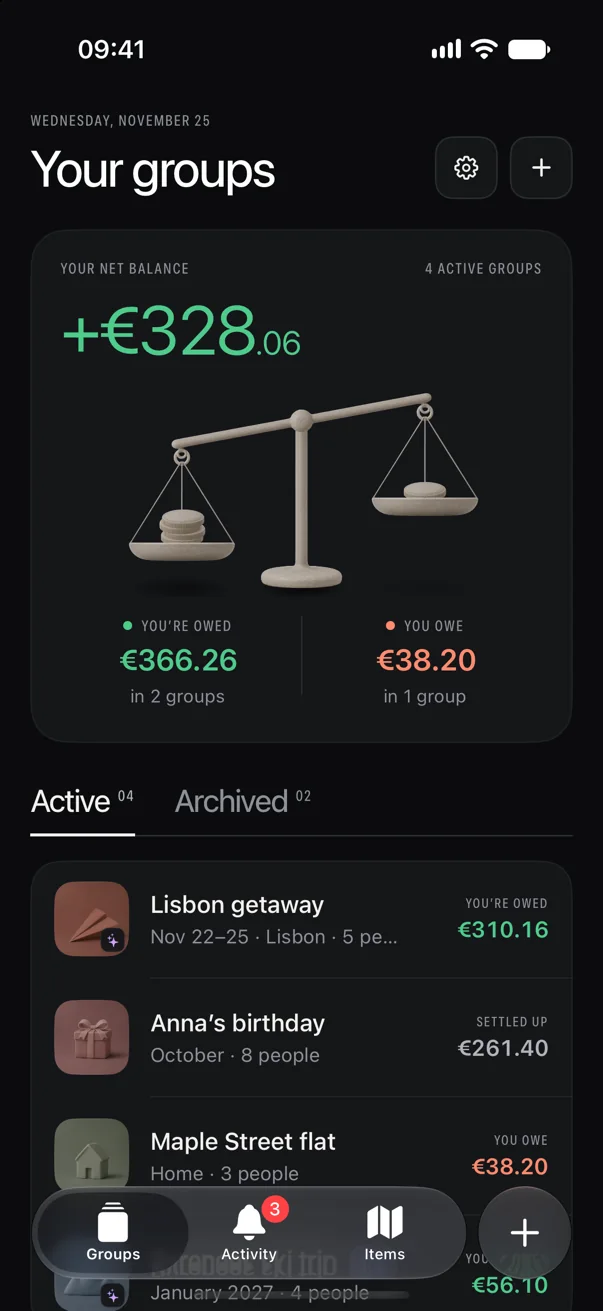
    • One net balance across all your groups, at a glance.
    • Record a payment in one tap when someone pays you back.
    • “Remind those who owe”, with a notification or a message already written.
    • A settle-up day for each group: that day, everyone gets told what they owe or are owed.
    Five friends. Without simplifying, ten crisscrossing payments. With Evens, four: Ana pays you €193.44, Pablo pays you €116.72, Marcos pays Lucía €86.14 and Pablo pays Lucía €30.52.

    Places and items

    The usual,
    with its price.

    Evens remembers where you spend and what you order at each place. Next round, just tap what everyone’s having.

    And with AI, not even the price. Type what you had and where, and Evens fills in what it costs there.
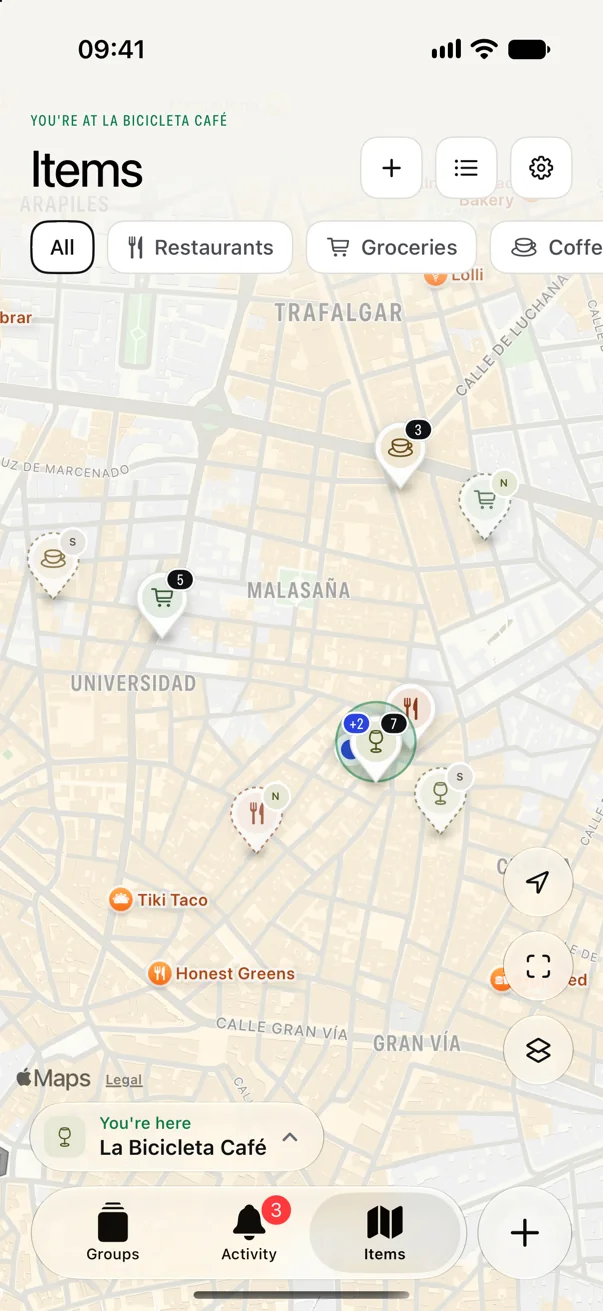
    The Items screen, with a map of Madrid showing the bars, restaurants and supermarkets where the group has spent.
    Your places, on the map. Bars, restaurants and your usual supermarket, with how much you’ve spent at each.
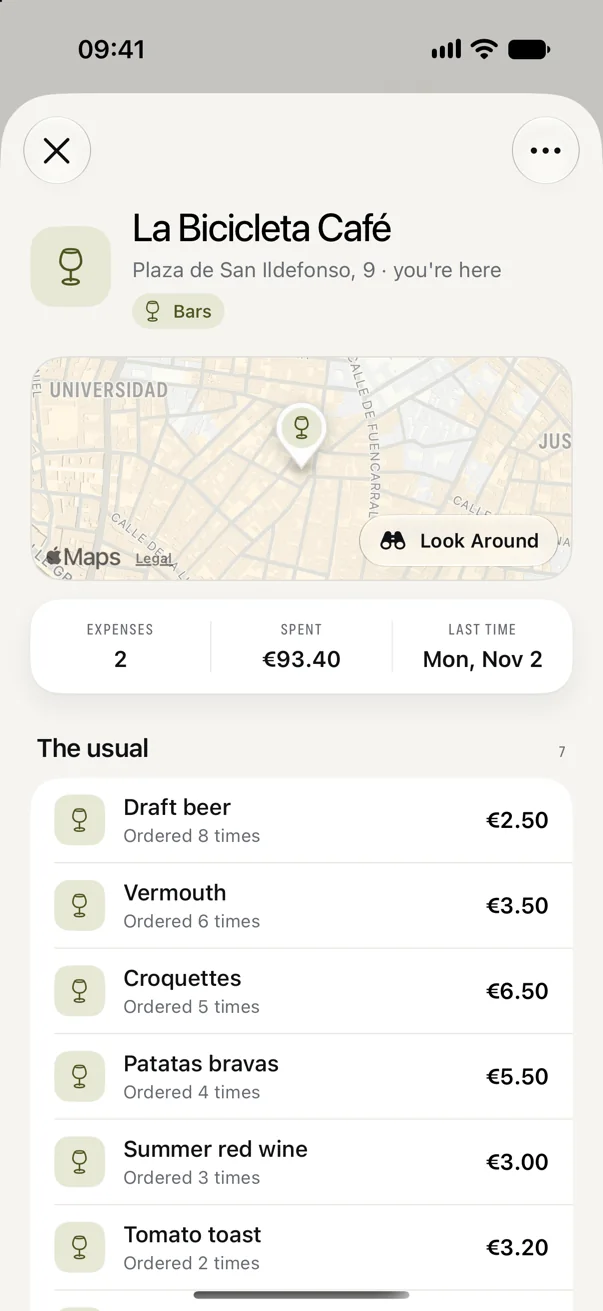
    La Bicicleta Café’s page: the usual, with its prices — draft beer €2.50, vermouth €3.50, croquettes €6.50, patatas bravas €5.50.
    Every place, its own menu. Draft beer, vermouth, croquettes: what you always order, with its price and how many times.
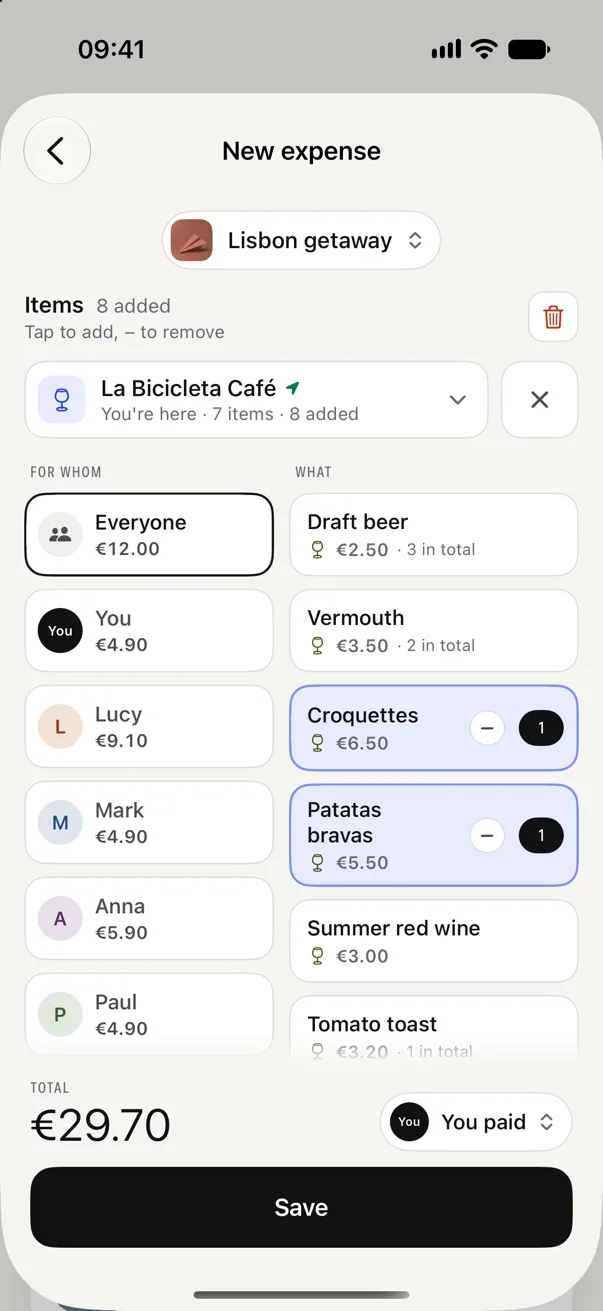
    A new expense split by item at La Bicicleta Café: who on the left, what was ordered on the right; €29.70 in total.
    The round, as you order. Tap what each person orders and the bar tab splits itself.

    And also

    Thought through
    to the last cent.

    Budgets

    How much you want to spend, and how much is left.

    Several at once: overall or by category, every month, every week or across the whole group. Whatever’s left over rolls into the next one.

    The pace

    Your stats, in one sentence.

    By day, week or month, and by category. Evens tells you whether you’re ahead of or under pace, and where you’ll end up if you keep going.

    Other currencies

    Paid in pounds? No problem.

    It’s recorded in the currency you paid in and converted to the group’s at that day’s rate.

    Regulars

    What repeats, one tap away.

    Mark an expense as regular and add another just like it without typing a thing.

    Invite

    Into the group, with a QR code.

    Or with its 7-character code. Whoever joins picks who they are, and you all see the same expenses.

    Dark mode

    Ink by night,
    ceramic by day.

    Every Evens color has its own dark version, designed by hand, not inverted.

    The little things

    • Several categories in one expense, when the shop was a bit of everything.
    • Expenses, income and transfers, so the balance really adds up.
    • A weekly reminder scheduled on the iPhone itself, so nothing goes unrecorded.
    • Notifications when someone adds an expense you’re part of or pays you back.
    • Export to CSV one group or all of them whenever you need it.
    • Sign in with Apple, and your groups are on all your iPhones.

    Pricing

    Free to start.
    The AI, for cents.

    Evens is free and ad-free for up to 5 groups. The AI is paid per group, not per person, and Premium is there for whoever keeps a lot of accounts.

    Evens

    $0

    Forever, with no ads.

    • Up to 5 groups, with no limit on expenses
    • Splitting by item, places and budgets
    • Debt simplification, reminders and a settle-up day
    • AI category suggestions, always free

    AI pass

    $0.49per group · 30 days

    One person buys it; the whole group uses it.

    • 200 uses: a typed or spoken expense uses 1; a receipt, 3
    • The purchase is added on its own as a shared expense, under “Evens AI”
    • Who pays for the pass? “Everyone” splits it; “My treat” doesn’t

    Evens Premium

    $1.49a month

    Or $14.99 a year, or $34.99 once.

    • Up to 30 groups at once, instead of 5
    • Gift AI passes: 1 a month, 12 a year or 24 with lifetime
    • It goes with your account, on all your iPhones

    Archived groups count toward the limit too. Gift passes last 30 days and 200 uses, like any other, and expire a year after you get them.

    Privacy

    No passwords.
    No tracking.

    No email, no password
    You sign in with Apple, and Evens only asks it for your first name; never your email. Every request is signed by a key your iPhone keeps in its security chip.
    Your voice stays on your iPhone
    Dictation is turned into text on the phone itself.
    AI only with your permission
    Receipts and what you type are read by Claude, Anthropic’s AI, and Evens asks you first. They go through the Evens server without your name or account, aren’t stored, and Anthropic doesn’t train on them. Only the expense you confirm is kept.
    No ads, no trackers
    Evens shows no advertising and doesn’t follow you across other apps or websites.
    Read the privacy policy

    Keep it even
    with friends.

    For the next trip, the shared flat or Friday’s dinner.

    Download on the App Store

    Free and ad-free · For iPhone